Flight scheduling guide
How to schedule store tastings
Start with one request form, separate approval from calendar assignment, and keep a record of what actually ran. A repeatable process helps store teams coordinate brands, distributors, and tasting agencies without piecing together dates and product details from separate messages.
This guide focuses on liquor stores, Flight's primary audience. Flight is not limited to liquor stores: other retailers that host tastings can use the same request, approval, and scheduling workflow, whether they operate one store or multiple locations.
1. Collect a complete tasting request
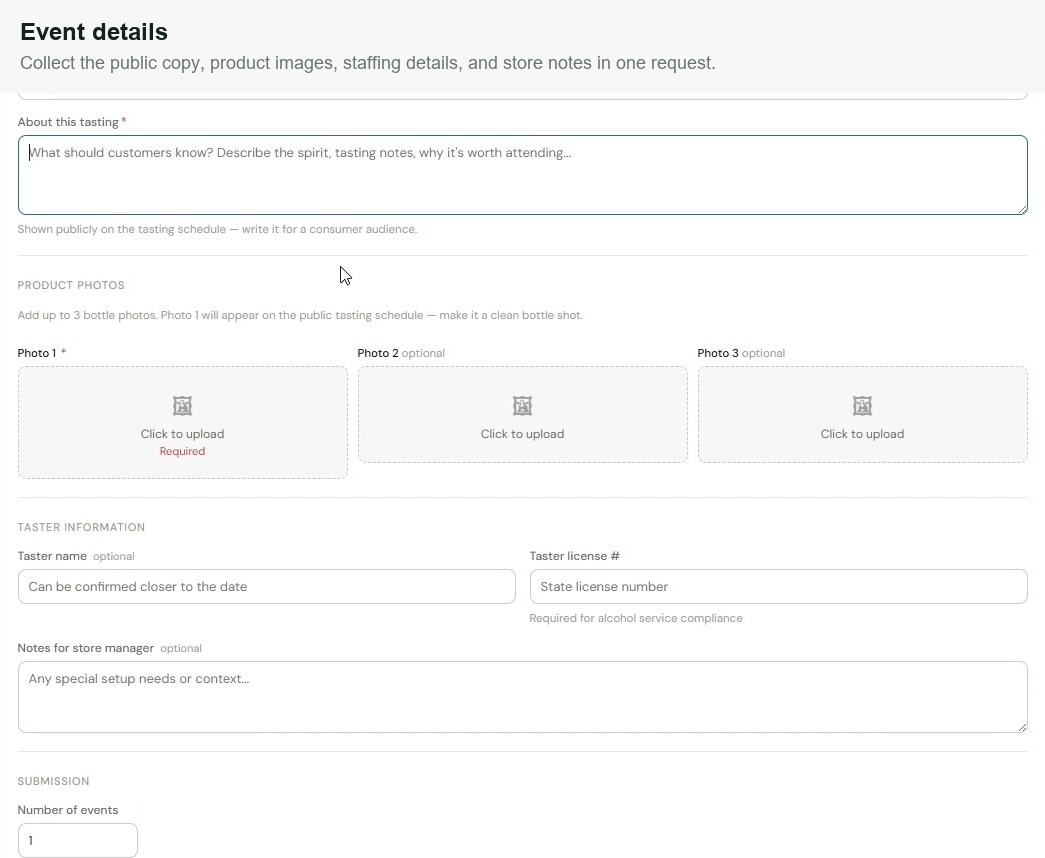
Give partners one place to request floor time. Before a manager makes a decision, the request should explain what will happen, which stores are involved, and what the event needs.
- Requester contact information and agency, when applicable.
- Brand, product, category, and event type, such as a tasting or bottle signing.
- A customer-facing description and product photos.
- Preferred locations, date range, days, times, and number of events.
- Setup notes for the manager, such as an electricity request for bottle engraving.
- Taster details and license information when applicable.
In Flight, stores can share a public request link with brands, distributors, and agencies without giving them a scheduler account. The request keeps product details, timing preferences, photos, and manager notes together.
Collecting a license number is not the same as verifying eligibility. Confirm applicable alcohol-service requirements and store policies separately.
2. Decide who approves and who schedules
Agree on two decisions: whether a tasting belongs in the store, and where it belongs on the calendar. They do not have to belong to the same person.
Flight supports separate approval and assignment roles. A merchandising team can approve or deny requests while a chain owner handles calendar assignments. Choose the roles that match your team's responsibilities.
Set a submission lead time that gives those people room to review the request. Flight lets the store configure how far ahead partners need to submit. Approval is a step toward scheduling, not a substitute for assigning an available slot.
3. Match approved requests to available slots
Compare the approved request's dates, locations, and timing preferences with the store's available slots. Check for competing activity before applying the schedule.
In Flight, teams can drag approved requests into available slots or use auto-assignment to stage suggested placements. Restrictions can include preventing the same brand and product from running concurrently at the same store.
Auto-assignment does not publish the schedule automatically. Review the staged assignments and apply them when you are ready. A suggested placement still needs the store team's judgment.
Watch the narrated auto-assignment walkthrough to see the rule selection and staging steps.
4. Plan for multiple locations
Do not assume every store needs the same event quantity or time window. Keep shared preferences together, but identify exceptions before scheduling.
A Flight request can contain multiple arrangements for different locations or scheduling variations. Each arrangement can have its own event quantity and day or time preferences. This supports requests that cover several stores without treating every location as an identical booking.
Use the calendar's location, region, or agency filters to focus the review. Check the relevant stores and upcoming dates before applying assignments.
5. Review the tasting and keep useful records
After the event, ask managers to review both the tasting and the taster. Keep that feedback connected to the event so the next scheduling decision has context.
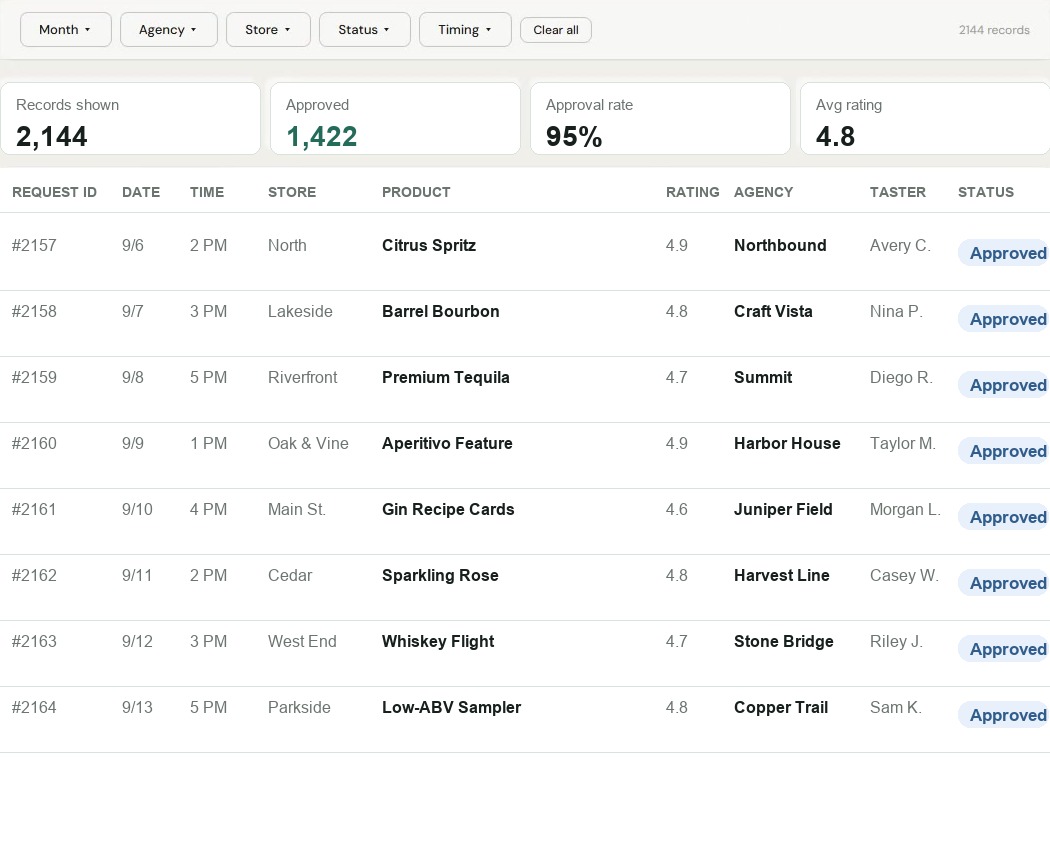
Flight reports bring together tasting records, approval totals, and average ratings. Teams can filter by month, agency, store, status, timing, and category, then export records or print reports as a PDF.
These records help teams review scheduling activity and manager feedback. Do not treat tasting counts or taster ratings alone as proof of sales impact.
Put your store's workflow into practice
Start with the request details you need, the people responsible for each decision, and the calendar rules your stores use. A Flight demo can walk through how those pieces fit together.
Book a Flight demo